OOP’S PILLAR’S

TYPE’S OF PILLAR’S ;

> INHERITANCE

> POLYMORPHISM

> ABSTRACTION

> ENCAPSULATION

> Now, that we will move a four pillars of the opps. Below the.

> Before see the , definition of class and objects .

CLASS ;

> class is a user-defined blueprint from which objects are created.

> It represents the set of properties or methods that are common to all objects of one type.

> Using classes, you can create multiple objects with the same behavior instead of writing their code multiple times.

> In general, class declarations can include these components in orde.

CLASS NAME ;

> The class name should be with the initial letter for capital by convention.

INTERFACE ;

> A comma-separated list of interfaces implemented by the class.

> if any, preceded by the keyword implements.

BODY ;

> the body tag is surrounded for the class braces. {}

OBJECT ;

> that represents real-life entities. A typical Java program creates many objects.

> which as you know, interact by invoking methods.

> The objects are what perform your code, they are the part of your code visible to the viewer. An object mainly user.

INDENTITY ;

> It is a unique name given to an object ,that enables it to interact with other objects.

INHERITANCE ;

> Inheritance is an important pillar of OOP’S.

> It is the mechanism in Java by which one class is allowed to inherit the features of another class. 

> Exp ; A child inherits the traits of her parent.

> With inheritance, we can reuse the fields and methods of the existing class.

TYPES OF INHERITANCE ;

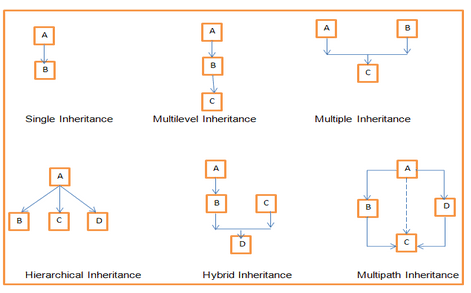
> SINGLE INHERITANCE

> MULTIPLE INHERITANCE

> MULTILEVEL INHERITANCE

> HIERARCHICAL INHERITANCE

> HYBRID INHERITANCE
SINGLE INHERITANCE ;

> In Single Inheritance one class extends another class ,one class only.


> EXP ,Class B extends only Class A. Class A is a super class and Class B is a Sub-class.

MULTIPLE INHERITANCE ;

> Java does not support multiple inheritance.


> EXP, Class C extends Class A and Class B both.

MULTILEVEL INHERITANCE ;

> Multilevel Inheritance, one class can inherit from a derived class.

> Hence, the derived class becomes the base class for the new class.


>EXP, Class C is subclass of B and B is a of subclass Class A.

HIERARCHICAL INHERITANCE ;

> Hierarchical Inheritance, one class is inherited by many sub classes.


> Exp, Class B, C, and D inherit the same class A.

HYBRID INHERITANCE ;

> Hybrid inheritance is one of the inheritance types in Java which is a combination of Single and Multiple inheritance.


> exp , all the public and protected members of Class A are inherited into Class D, first via Class B and secondly via Class C.

PROGRAM EXAMPLE ;

class Doctor

{
Public static void Doctor_Details()

{
System.out.println(“Doctor Details…”);
}
}

class Surgeon extends Doctor

{
void Surgeon_Details() {
System.out.println(“Surgen Detail…”);
}
}

public class Hospital

{
public static void main(String args[])

{
Surgeon s = new Surgeon();
s.Doctor_Details();
s.Surgeon_Details();
}
}

POLYMORPHISM ;

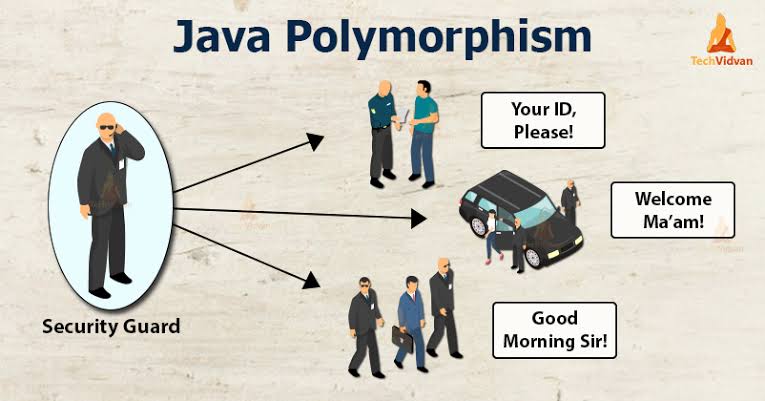
> Polymorphism means *many forms*. And it occurs when we have many classes that are related to each other by inheritance.

> Inheritance  lets us inherit attributes and methods from another class. 

> Polymorphism uses those methods to perform different tasks.

> This allows us to perform a single action in different ways.

TYPES OF POLYMORPHISM ;

> COMPLIE TIME POLYMORPHISM

> RUN-TIME POLYMORPHISM
COMPILE TIME POLYMORPHISM ;

> It is also known as static polymorphism. This type of polymorphism is achieved by function overloading.

METHOD OVERLOADING ;

> When there are multiple functions with the same name but different parameters then these functions are said to be overloaded.

METHOD OVERRIDING ;

> It is also known as Dynamic Method Dispatch.

> It is a process in which a function call to the overridden method is resolved at Runtime.

> This type of polymorphism is achieved by Method Overriding.

PROGRAM ;

class Animal

{
public void animalSound()

{
System.out.println(“The animal makes a s ound”);
}
}

class Pig extends Animal

{
public void animalSound()

{
System.out.println(“The pig says: wee wee”);
}
}

class Dog extends Animal

{
public void animalSound()

{
System.out.println(“The dog says: bow wow”);
}
}

class Main

{


public static void main(String[] args)

{
Animal myAnimal = new Animal(); // Create a Animal object
Animal myPig = new Pig(); // Create a Pig object
Animal myDog = new Dog(); // Create a Dog object
myAnimal.animalSound();
myPig.animalSound();
myDog.animalSound();
}
}

> Another types will be soon …….
GENERATION OF COMPUTERS

WHAT IS COMPUTER ;

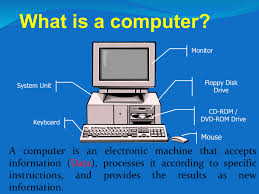
> A computer is a machine. that can store and process information.

> Most computers rely on a binary system, which uses two variables, 0 and 1, to complete tasks such as storing data, calculating algorithms, and displaying information.

> Computers come in many different shapes and sizes, from handheld smartphones to supercomputers weighing more than 300 tons.

FIVE GENERATION OF COMPUTER’S ;


> First Generation: Vacuum tubes[1940-1956]


> Second Generation: Transistors[1956-1963]


> Third Generation: Integrated Circuits[1964-1971]


> Fourth Generation: Microprocessors[1971-PRESENT]


> Fifth Generation: Artificial Intelligence[PRES NT TO BEYOND]

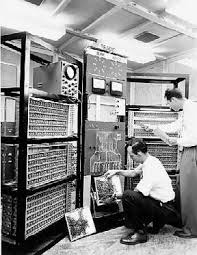
FIRST GENERATION ;

> the first computers generated a lot of heat, which was often the cause of malfunctions.

> The maximum internal storage capacity was 20,000 characters.

> First-generation computers relied on machine language, the lowest-level programming language understood by computers, to perform operations, and they could only solve one problem at a time.

> It would take operators days or even weeks to set up a new problem. Input was based on punched cards and paper tape, and output was displayed on printouts

SECOND GENERATION ;

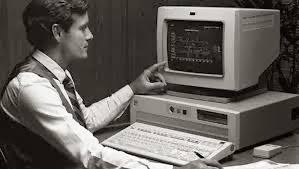
> The main electronic component used in the computers of the 1950s to 1960s era were transistors.

> The main memory storing units were magnetic tape or disk and magnetic core.

> The assembly language was used as the programming language.

> The sizes were smaller as compared to those of the first generation and they used to consume low power and generate less heat.

>There was an improvement in speed.The input/output devices were magnetic tape and punched cards.

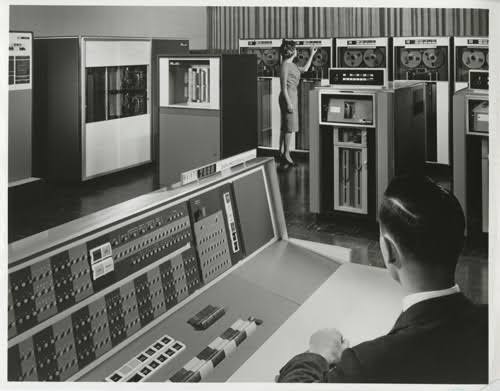
THIRD GENERATION ;

> The main electronic components used in the computers of the era 1060s to 1970s were integrated circuits ICs.

> The memory storing units were the magnetic disk or take and a large magnetic core.

> High-level languages such as BASIC, COBOL, Pascal were used as the programming language.

> The sizes were smaller and efficient and the computers were called minicomputers.

> There was an improvement in reliability and speed as compared to the second generation of computers.

> The input/output devices were keyboards, magnetic tape monitor, printer, etc.

FOURTH GENERATION ;

> the fourth generation of computers are microprocessors and very large scale integration (VLSI).

> When thousands of transistors are attached to a single microchip, it is known as VLSI.

> Semiconductor memory storage units such as RAM, ROM, etc were introduced.

> RAM (random-access memory)- Temporarily stores the programs and data and the contents are lost when the computer is shut down.

> ROM (read-only memory)- Permanently stores the data and programs and the contents are retained even after shutting down the computer.

>High-level languages such as C#, JAVA, Python, JavaScript are used as programming languages

>The sizes are smaller and the speed has improved.

> The input/output devices are a monitor, mouse, keyboard, printer, and so on, etc…

FIFTH GENERATION ;

> the present generation of computers is Artificial Intelligence which uses the parallel processing method and the Ultra-Large Scale Integration (ULSI).

> The fifth generation of computers understands the natural human language.

> The speeds are really fast and the sizes are also small.

> The fifth-generation computers are portable and have a huge storage capacity.

> The input/output devices are keyboards, monitors, touchscreen pens, printers, light scanners, and so on.

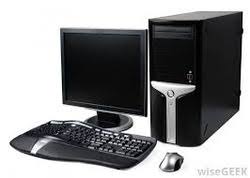
> Examples are laptops, desktops, tablets, smartphones, etc.

BENEFITS OF COMPUTER’S ;

> The benefits of using computers involve multitasking. With the help of computers, people can do multiple works at the same time.

> Computers have the tendency to perform millions or billions of tasks in 1 second which help the users to finish their tasks in just a few seconds.

> The data is secured on the computer without any risk.

> People can store a great number of files on the computer instead of carrying so many paper files.

> The use of computers the level of productivity of a person gets doubled or tripled since the work can be done really fast.

  OPERATORS of JAVA ;

TYPE OF OPERATORS ;

                     > Operators means, java are the special type of token in java which when coupled with entities.

                 > As a variables or constants or data types results in a specific operation.

             > Such as examples, addition, multiple, or even shifting of bits.

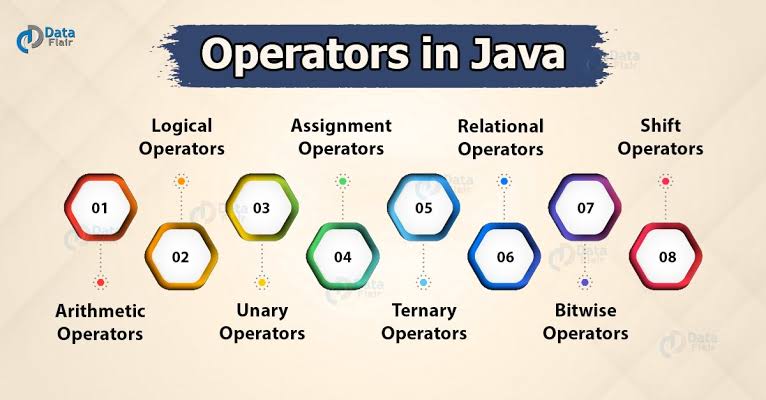
THE MAINLY FOLLOWING TYPE ;

> Arithmetic Operators


> Logical Operators


> Unary Operators


> Assignment Operators


> Ternary Operators


> Relational Operators


> Bitwise Operators

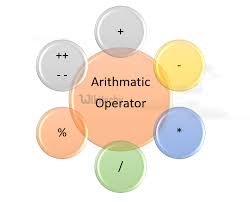
ARITHMETIC OPERATOR ;

                          > Arithmetic Operators are used to perform arithmetic operations. There are mainly 5 arthmetic opertor in java.

                        1. Additional

> A like as, Addition operator performs addition between two entities on either side of the operator.

                        2.subtraction

> A like as, Subtraction operator performs subtraction between two entities on either side of the operator.

                       3.multiplication

> A like as, Multiplication operator performs multiplication between two entities on either side of the operator.

                       4.Division

> A like as ,Division operator performs division and returns the quotient value of the division.

                       5.Modulo

> A like as , modulo opertor return the remainder after dividing the two operands .

SIMPLEX EXAMPLE ;


  public class ArithmeticOperator {
      public static void main(String[] args)  {
        int add,
        sub,
        mul,
        div,
        mod;
        int num1 = 5,
        num2 = 8;
        add = num1 + num2;
        sub = num1 – num2;
        mul = num1 * num2;
        div = num1 / num2;
        mod = num2 % num1;
    System.out.println(“Addition num1+num2 ” + add);
    System.out.println(“Subtraction num1-num2 ” + sub);
    System.out.println(“Multiplication num1*num2 ” + mul);
    System.out.println(“Division num1/num2 ” + div);
    System.out.println(“Modulus num2%num1 ” + mod);
  }
}

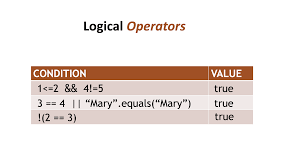
LOGICAL OPERATORS ;

        > jogical operators, like a perform in two type of Operators. They are primarily type of Operators.

                        > Logical AND in java

                        > Logical OR in java

LOGICAL AND IN JAVA ;

           > Logical AND checks whether the two conditions on either side of the expression is true.

           > If both the expressions are true then it returns false.

LOGICAL OR IN JAVA ;

            > checks whether either of the two conditions in the expression is true. If any one of the expressions is true, it evaluates to true.

             > However if none of the conditions are true then it returns false.

             > One thing to note is that if the first expression is already true it doesn’t check the second expression and returns true.

UNARY OPERATORS ;                 

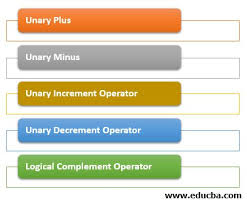
                > Unary operators are those which have only one operand. They are of the following types  .that’s below ,

   >  Unary plus Operator
     >  Unary minus Operator
>  Increment Operator
>  Decrement Operator
>  Logical Not Operator,

UNARY PLUS OPERATORS ;

                     > A like , Unary plus operator converts byte short and character datatype values into integer values. 

                     > Characters when converted to integers return their ASCII value.

UNARY MINUS OPERATORS OR NEGATIVE OPERATORS ;

                > Simpl to Deliberately converts a positive value to a negative value.

INCREMENT OPERATORS ;

                 > A like as, increment operator is used for increasing the value of a particular value by one.

                > However there are a few concepts linked with the increment operator. There are two tyoesy.below ,

PRE- INCREMENT ;

Uni                > the value of the variable is first increased and then its used/ or its result is computed.           Exp-       (++a );

POST- INCREMENT ;

                > the value of the variable is first computed and then incremented. Exp- (a++)

DECREMENT OPERATOR ;

               > A like , decrement operator is just as opposite to the increment operator. It decreases the value of the variable by 1.

PRE-DECREMENT ;

                > the value of the variable is first decreased and then computed. Exp . –a

POST- DECREMENT ;

                > the value of the variable is first computed and then decremented by 1. Exp. a–

LOGICAL NOT OPERATOR ;

                 > Java logical Not operator flips the value of a boolean value. It is denoted by a !.

ASSIGNMENT OPERATORS ;

                 > Assignment operators are used to assign values to the variables on the left side of the equals sign.

              > The associativity is from right to left. Meaning that the values on the right are assigned to the values on the left.

             > The right hand side has to be a constant or a defined variable.

TYPE OF ASSIGNMENT ;

               > += This returns left=left+right
               >  -= This returns left=left-right
               >  *= This returns left=left*right
               >  /= This returns left=left/right
               >  %=This returns left=left%right

> As a examples of assignment operator.

RELATIONAL OPERATORS ;

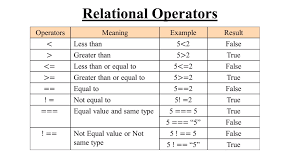
               > Relational Operators are used to check the relation between values or variables.

               > The output of relational operators is always a boolean value.

              >  Relational operators are used by if conditions and for loop constraints.

SOME RELATIONAL OPERATORS ;

               #  < Less than – returns true if left entity lesser than right entity.

               #  >Greater than – returns true if left entity greater than right entity.

               #  <=Less than or equal to – returns true if the left entity is smaller than or equal to right.

                #  >=Greater than or equal to – returns true if left variable is greater than or equal to right entity.

                # ==(equals to) – returns true if the left and the right entities are equal.

                # !=(not equals to) – returns true if left and right entities are not equal.

BITWISE OPERATOR ;

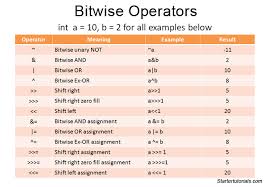
             > Bitwise operators are generally used to perform operations on bits of data.

             > The individual bits of a number are considered in calculation and not the entire number itself.

TYPE OF BITWISE OPERATOR ;

            >AND &

            >OR |

             >XOR ^

            > COMPLEMENT ~

> those are important. There are using a more .after that , operators in minimum usages in our operator.

See java ,

HISTORY OF JAVA

    > The history of Java is very awesome.  Java was originally design in interactive television .but ,it was to advanced techonology for the digital cable industry.

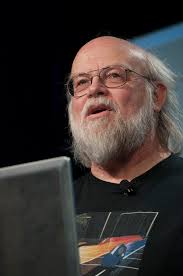
   > Initially developed by James Gosling at Sun Microsystems (which is now a subsidiary of Oracle Corporation) and released in 1995.


                        Dr . Java          

Who’s James Gosling ;

               > James Gosling OC (born May 19 1955), often referred to as “Dr. Java,” is a Canadian computer scientist, best known as the founder and lead designer behind the Java programming language.     

               > James Gosling, Mike Sheridan, and partrick Naughton ,there team members. After a like initiated the java language project in June 1991. There are small team for sun engineers called green team.

WHY  OAK ?

          >  Oak is simple of strength . After that , like a nation tree of many countries. Like  the u.s.a.,France,Germany,Romania,etc…

WHY RENAME FOR JAVA ?

          > The team members refer a lot of name . What’s that name. Below the line .

          > Dynamic, revolutionary,silk,dna,jolt,etc…but James Gosling, according to Java was one of the top choice with silk . Since Java was so unique,most of the team members preferred java.

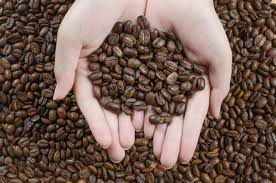
           > Java is an island in Indonesia where the first coffee was produced .it is a kind of espresso bean java name was chosen by James Gosling while having a Cup of coffee nearby his office.

JAVA VERSION HISTORY ;

                       > JDK 1.0 was released on January 23, 1996. After the first release of Java, there have been many additional features added to the language.

   > JDK Alpha and Beta (1995)


  > JDK 1.0 (23rd Jan 1996)


> JDK 1.1 (19th Feb 1997)


> J2SE 1.2 (8th Dec 1998)


> J2SE 1.3 (8th May 2000)


> J2SE 1.4 (6th Feb 2002)


> J2SE 5.0 (30th Sep 2004)


> Java SE 6 (11th Dec 2006)


> Java SE 7 (28th July 2011)


> Java SE 8 (18th Mar 2014)


> Java SE 9 (21st Sep 2017)


> Java SE 10 (20th Mar 2018)


> Java SE 11 (September 2018)


> Java SE 12 (March 2019)


> Java SE 13 (September 2019)


> Java SE 14 (Mar 2020)


> Java SE 15 (September 2020)


> Java SE 16 (Mar 2021)


> Java SE 17 (September 2021)


> Java SE 18 (to be released by March 2022)

LEARNING JAVA ,

Basically, firt off all everyone say in Java is a object oriented programming. why ?

But, just different ; (easy to learn),

Java is a general-purpose programming language, that is class-based and object-oriented. Java like a , classes and objects. After that, calls a attributes and methods.

Example ;

In a real life, human is a object. The human has attributes . After, a body and color, weight and method, after like a walk and stop ,etc….

Why use java ;

Java can be used in many different applications, but here are the most popular ways the language is used:

Application ;