✓ CONSTRUCTOR .

EXPLAIN ;

> A like as, constructor in Java is similar to a method that is invoked when an object of the class is created.

> Unlike Java methods, a constructor has the same name as that of the class and does not have any return type.

> For example, class Bike { Bike() { // constructor body } } Here, Bike () is a constructor.

TYPES ;

> Now is the correct time to discuss the types of the constructor, so primarily there are two types of constructors in java,

> No-argument constructor
> Parameterized Constructor

NO-ARGUMENT CONSTRUCTOR ;

> A constructor that has no parameter is known as the default constructor.

> If we don’t define a constructor in a class.

> then the compiler creates a default constructor(with no arguments) for the class.

> And if we write a constructor with arguments or no arguments then the compiler does not create a default constructor.

PARAMETERIZED ;

> constructor that has parameters is known as parameterized constructor.

> If we want to initialize fields of the class with our own values, then use a parameterized constructor.

PROGRAM ;

classEmp

     / / constructor with one argument

{

     Emp(String name)

    {

        System.out.println("Constructor with one "+

                      "argument - String : "+ name);

    }

    // constructor with two arguments

   Emp(String name, intage)

    {

        System.out.println("Constructor with two arguments : "+

                " String and Integer : "+ name + " "+ age);

    }

     // Constructor with one argument but with different

    Emp(log id)

    {

        System.out.println("Constructor with one argument : "+

                                            "Log : + id);

    }

}

class company

{

    public static void main(String[] args)

    {

        // Creating the objects of the class named 'Emp’

        // by passing different arguments

        Emp staff = newEmp("Sp”);

        // Inside the constructor with two arguments

        // the constructor with one argument of

        Emp staff 2 = neEmp("sp”, 22);

        Emo staff 3 = newEmp(1234567);

    }

}

JDK ; JRE ; JVM

EXPLAIN JDK ;

> A like ,JDK is Java Development Kit which includes all the tools.

> executable and binaries required to compile, debug and execute a Java Program.

> JDK is platform dependent i.e there is separate installers for Windows, Mac, and Unix systems.

> JDK includes both JVM and JRE and is entirely responsible for code execution.

> It is the version of JDK which represent version of Java.

EXPLAIN JRE ;

>Another one,JRE is Java runtime environment which is the implementation of JVM .

> the specifications which are defined in JVM are implemented and creates corresponding environment for the execution of code.

> JRE comprises mainly java binaries and other classes to execute the program .

> A like of JVM it physically exists. Along with Java binaries JRE also consist of various technologies of deployment.

> user interfaces to interact with code executed, some base libraries for different functionalities and language and util based libraries.

EXPLAIN JVM ;

> Another one, Java virtual machine which is basically specification that provides a runtime environment .

> In which Java byte code can be executed .

> it is something which is abstract and its implementation is independent .

> the algorithm and has been provided by Sun and other companies.

> It is JVM which is responsible for converting Byte code to the machine specific code.

> It can also run those programs which are written in other languages and compiled to Java bytecode.

> The JVM performs the mentioned tasks: Loads code, Verifies code, Executes code, Provides runtime environment.

JVM ARCHITECTURE ;

# CLASS LOADER ;

> Classloader is a subsystem of JVM which is used to load class files.

> Whenever we run the java program, it is loaded first by the classloader.

1. BOOTSTRAP CLASS LOADER

2. EXTENSION CLASS LOADER

3. SYSTEM CLASS LOADER

METHOD AREA ;

> Class(Method) Area stores per-class structures.

> such as the runtime constant pool, field and method data, the code for methods.

HEAP ;

>It is the runtime data area in which objects are allocated [Created].

STACK ;

> It holds local variables and partial results, and plays a part in method invocation and return.

> Each thread has a private JVM stack, created at the same time as thread.

> A new frame is created each time a method is invoked.

> A frame is destroyed when its method invocation completes.

PROGRAM COUNTER RESISTER ;

> PC… (program counter) register contains the address of the Java virtual machine instruction currently being executed.

NATIVE METHOD STACK ;

>It contains all the native methods used in the application.

EXECUTION ENGINE ;

> virtual processor.

> Interpreter Read bytecode stream then execute the instructions.

JUST IN TIME ;


> JIT compiler ,It is used to improve the performance.

> JIT compiles parts of the byte code that have similar functionality at the same time.

> And hence reduces the amount of time needed for compilation.

> Here, the term “compiler” refers to a translator.

> the instruction set of a Java virtual machine (JVM) to the instruction set of a specific CPU.

JAVA NATIVE INTERFACE ;

> Java Native Interface (JNI) is a framework.

> which provides an interface to communicate with another application written in another language .

> A like C, C++, Assembly etc.

> Java uses JNI framework to send output to the Console or interact with OS libraries.

< Math Class >

EXPLAIN Math ;

>Java Math class provides several methods to work on math calculations.

> like min(), max(), avg(), sin(), cos(), tan(), round(), ceil(), floor(), abs() etc.

ADD EXTRACT ;

> If the size is int or long and the results overflow the range of value.

> the methods addExact(), subtractExact(), multiplyExact(), and toIntExact() throw an ArithmeticException.

PROGRAM ;

public class Math
{


public static void main(String[] args)
{


double x = 1;
double y = 2;


System.out.println(“Maximum number of x and y is: ” +Math.max(x, y));


System.out.println(“Square root of y is: ” + Math.sqrt(y));

System.out.println(“square root of x is:” + math.sqrt(y));


System.out.println(“Power of x and y is: ” + Math.pow(x, y));


System.out.println(“Logarithm of x is: ” + Math.log(x));


System.out.println(“Logarithm of y is: ” + Math.log(y));


System.out.println(“log10 of x is: ” + Math.log10(x));


System.out.println(“log10 of y is: ” + Math.log10(y));


System.out.println(“log1p of x is: ” +Math.log1p(x));


System.out.println(“exp of a is: ” +Math.exp(x));


System.out.println(“expm1 of a is: ” +Math.expm1(x));


}


}

TRIGONO-METRIC MATH ;

public class sin
{


public static void main(String[] args)
{


double a = 30;


double b = Math.toRadians(a);


System.out.println(“Sine value of a is: ” +Math.sin(a));


System.out.println(“Cosine value of a is: ” +Math.cos(a));


System.out.println(“Tangent value of a is: ” +Math.tan(a));


System.out.println(“Sine value of a is: ” +Math.asin(a));


System.out.println(“Cosine value of a is: ” +Math.acos(a));


System.out.println(“Tangent value of a is: ” +Math.atan(a));


System.out.println(“Sine value of a is: ” +Math.sinh(a));


System.out.println(“Cosine value of a is: ” +Math.cosh(a));


System.out.println(“Tangent value of a is: ” +Math.tanh(a));

}


}

INTERFACE

EXPLAIN ;

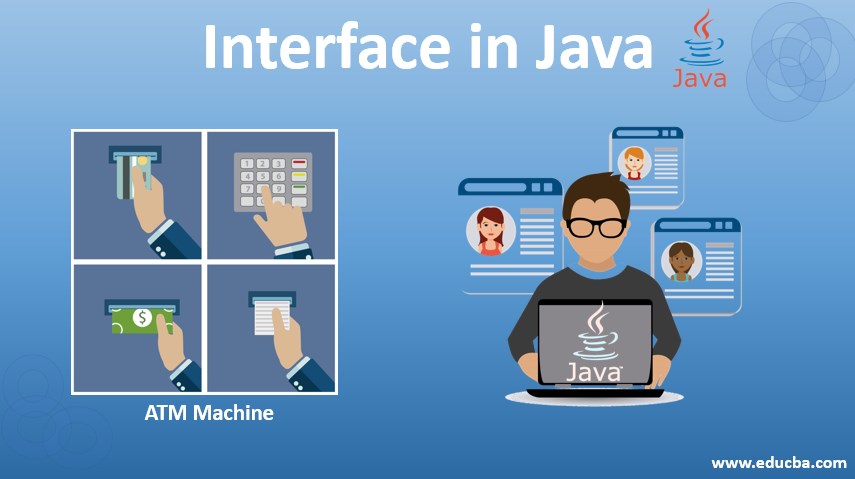
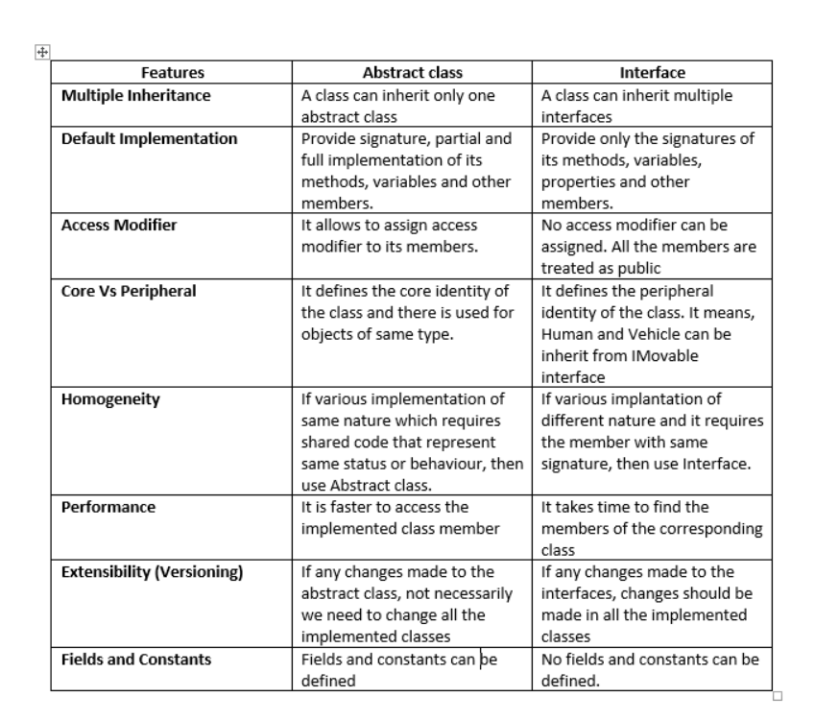
> An interface in Java is a blueprint of a class. A Java interface contains static constants and abstract methods.

> The interface in Java is a mechanism to achieve abstraction.

> A class implements an Interface to inherit the abstract methods.

ADVANTAGES ;

> Java Interface supports Multiple Inheritance.


> Java Interface enables programmers to break up the complex programming approaches.

> simplify the dependencies between the objects.
Java Interface makes the data members.

> methods in an application to be loosely coupled.

DISADVANTAGES ;

> Use of Java Interface brings down the execution speed of the application.


> Java Interfaces in the application are either used repeatedly at large extent or hardly used at all.

ABSTRACT ;

> Abstract class can have abstract and non-abstract methods.

> Abstract class doesn’t support multiple inheritance.

> Abstract class can have final, non-final, static and non-static variables.

> An abstract class can be extended using keyword extends.

PROGRAM ;


interface In1 {


// public, static and final

final int a = 100;


// public and abstract

void display();


}


class TestClass implements In1 {


public void display() {

System.out.println(“values”);

}


public static void main(String[] args)

{

TestClass t = new TestClass();


t.display();


System.out.println(a);

> STATIC <

WHAT IS STATIC ;

> A like as, it can be accessed before any objects of its class are created, and without reference to any object.

STATIC VARIABLE ;

  • We can create static variables at the class level only.
  • static block and static variables are executed in the order they are present in a program.

. Static variables are, essentially, global variables.

STATIC METHOD ;

. The most common example of a static method is the main( ) method.

. Any static member can be accessed before any objects of its class are created.

. And without reference to any object.

. Methods declared as static have several restrictions.

. They can only directly call other static methods.


. They can only directly access static data.

STATIC VARIABLE AND METHOD ;

. Use the static variable for the property that is common to all objects.

. . Exp, in class Student, all students share the same college name.

. Use static methods for changing static variables.

PROGRAM ;

class Student {

String name;

int RollNo;


// static variable

static String clgName;


static int counter = 0;


public Student(String name)

{

this.name = name;


this.rollNo = setRollNo();

}


static int setRollNo()

{

counter++;

return counter;

}


// static method

static void setClg(String name) { clgName = name; }


void getStudentInfo()

{

System.out.println(“name : ” + this.name);

System.out.println(“rollNo : ” + this.rollNo);


// static variable

System.out.println(“cllgName : ” + cllgName);

}
}


public class StaticDemo {

public static void main(String[] args)

{

Student.setCllg(“Dhanalakshmi Srinivasan”);


Student s1 = new Student(“surya”);

Student s2 = new Student(“mani”);


s1.getStudentInfo();

s2.getStudentInfo();

}

}

BINDING ;

> A like as, binding is a two types . There are below the line.

> DYNAMIC BINDING

> STATIC BINDING

DYNAMIC BINDING ;

> *!Dynamic binding or late binding!* is the mechanism a computer program waits until runtime to bind the name of a method called to an actual subroutine.

> It is an alternative to early binding or static binding where this process is performed at compile-time.

PROGRAM ;

> public class FastFood {
public void create() {
System.out.println(“Cooking a FastFood “);
}
}


public class Pizza extends FastFood {
public void create() {
System.out.println(“Cooking a Pizza hunt”);
}
}


public class Main {
public static void main(String[] args) {


FastFood fastFood= new FastFood();
fastFood.create();
//Dynamic binding


FastFood pza= new Pizza();
pza.create();
}
}

FINAL METHOD ;

> the final keyword is used to denote constants.

> It can be used with variables, methods, and classes.

> Once any entity (variable, method or class) is declared final , it can be assigned only once.

PROGRAM ;

class FinalDemo {
// create a final method


public final void display() {
System.out.println(“This is a final method.”);
}
}


class Main extends FinalDemo {
// try to override final method


public final void display() {
System.out.println(“The final method is overridden.”);
}


public static void main(String[] args) {
Main obj = new Main();
obj.display();
}
}

DOUBLE LOOP ;

Public class line3 {

Public static void main (String[]args) {

Int a = 1 ; Int b = 2;

For(int i = 1; i<=5; i++) {

For( int j = 0; j<=5 ; j++) {

If( j%2 == 0)

System.out.print(a);

Else {

System.out.print(b);

}

}

System.out.print(\n);

Int Temp = a ;

a = b ;

b = temp ;

}

}

}

Abstraction

EXPLAIN ;

> Abstraction ; the process of hiding certain details and showing only essential information to the user.

EXAMPLE ;

> it shows only essential things to the user and hides the internal details, for example, sending SMS where you type the text and send.

TYPES ;

> There are two type uses in abstraction.

> Data abstraction

> process abstraction

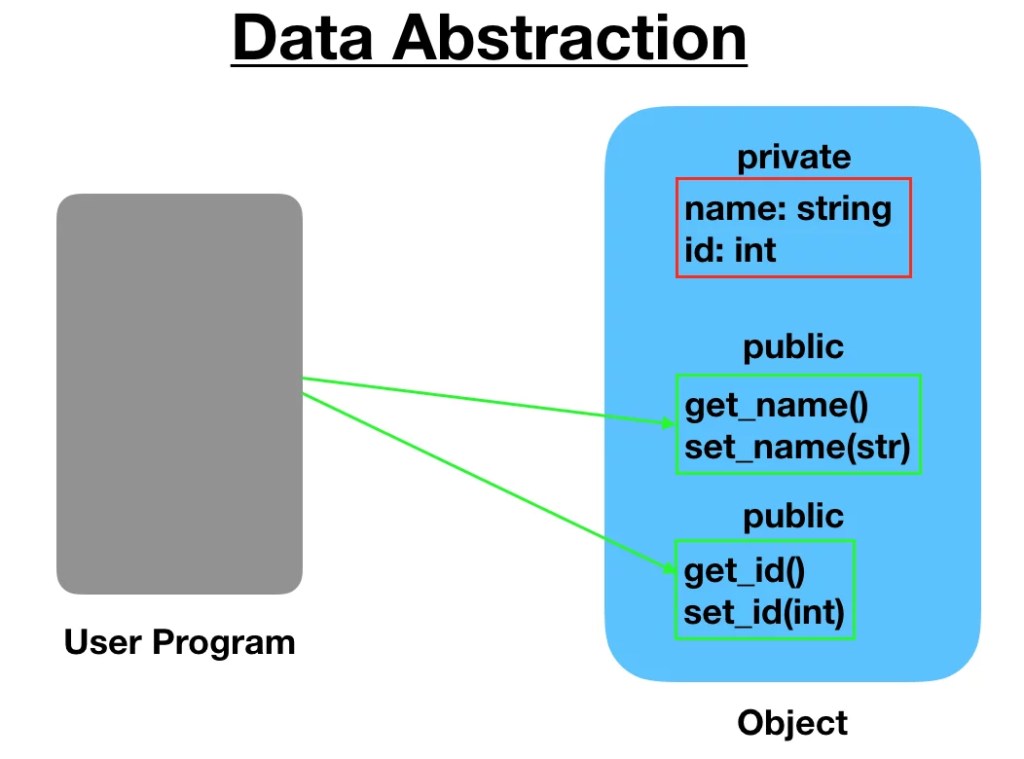
DATA ABSTRACTION ;

> When the object data is not visible to the outer world, it creates data abstraction.

> If needed, access to the Objects’ data is provided through some methods.

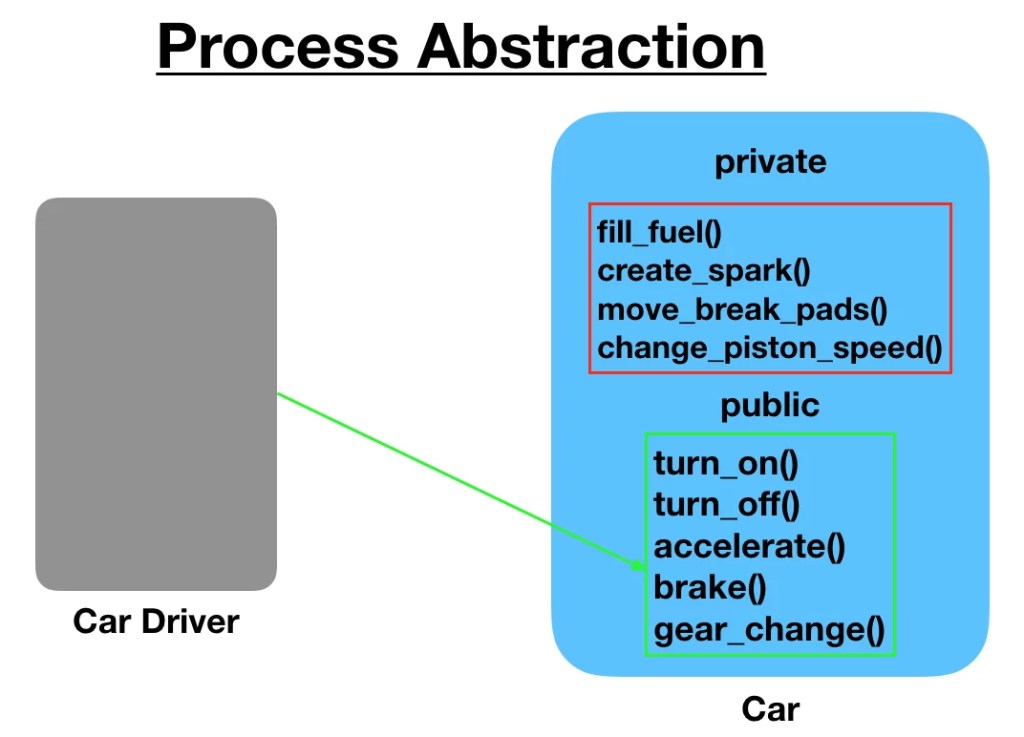
PROCESS ABSTRACTION ;

> We don’t need to provide details about all the functions of an object.

> When we hide the internal implementation of the different functions involved in a user operation, it creates process abstraction.

PROGRAM ;

abstract class Bank{
abstract int Interest();
}


class SBI extends Bank{
int Interest() {

return 100;

}
}


class IOB extends Bank. {
int Interest() {

return 50;

}
}

class TestBank. {
public static void main(String args[]) {

Bank b;

b=new SBI();


System.out.println (“the Interest is:”+Interest()+” %”);


b=new IOB();

System.out.println (“the. Interest is: “+b.Interest()+” %”);

}

}

USING A DOUBLE (FOR LOOP) ;

Public class line {

Public static void main(String[]args) {

Int num = 1 ;

For(int row = 5; row>=1; row–) {

For(int col = 1; col<=1; col++) {

System.out.print(row+” “+num);

}

System.out.println();

Num++;

}

}

}

USING A DOUBLE (WHILE LOOP) ;

Public class line2 {

Public static void main (String[]args) {

Int row = 1;

While ( row <=7) {

Int col = 1 ;

While ( col <=7) {

System.out.print(col);

Col++;

}

Row++;

System.out. println(” “);

}

}

}

LOOPING STATEMENT

PALINDROMES ;

> A like as ,string is called a palindrome string if the reverse of that string is the same as the original string.

> For example, radar, level, etc.

> Similarly, a number that is equal to the reverse of that same number is called a palindrome number.

> For example, 3553, 12321, etc.

USING WHILE LOOP ;

Public class palindrome

{

Public static void main(String[]args)

{

Int n = 1211;

Int p, sum = 0;

Int Temp = n ;

While (n>0)

{

P = n%10;

Sum = ( sum * 10)+P;

n = n/10;

}

System.out.println(“value is :: “+sum);

If (temp == sum)

{

System.out.println (“value is true”);

}

Else

{

System.out.println(“value is false”);

}

}

}

FACTORIAL ;

> Factorial of a positive integer n is the product of all values from n to 1.

> For example, the factorial of 3 is (3 * 2 * 1 = 6)

PROGRAM ;

Public class Fact

{

Public static void main (String[]args)

{

Fact fact = new Fact ();

fact (30);

}

Static void fact (int n)

{

Int fact = 1;

For (int i = 1; i<=n ; i++)

{

fact = fact * i ;

}

System.out.println(“Fact value is ::”+ fact);

}

}

PRIME NUMBER ;

> Prime number is a number that is greater than 1 and divided by 1 or itself only.

> In other words, prime numbers can’t be divided by other numbers than itself or 1.

> For example 2, 3, 5, 7, 11, 13, 17……are the prime numbers.

PROGRAM ;

Public class prime

{

Public static void main (String[]agrs)

{

Prime value = new prime ();

Value.primeNum(50) ;

}

Void primeNum ( int p )

{

Int count = 0 ;

For ( int s = 1 ; s<=p ; s++) ;

{

Int t = p%s ;

If (t == 0)

{

t ++ ;

Count = count + t ;

}

}

If ( count == 1)

{

System.out.println(“there is a prime”);

}

else

{

System.out.println(“there is a non prime”);

}

}

WHILE AND FOR LOOP ;

> It is normally used when the number of iterations is unknown.

> Initialization is always outside the loop.

> While is also entry controlled loop.

> while ( condition ) { statement(s); }

FOR LOOP ;

> It is used when initialization and increment is simple.

> Initialization may be either in loop statement or outside the loop.

> For is entry controlled loop.

> for ( init ; condition ; iteration ) { statement(s); }

CONTROL STATEMENT

WHAT IS CONTROL STATEMENT ;

>control statement in java is a statement that determines whether the other statements will be executed or not.

>It controls the flow of a program.

> An ‘if’ statement in java determines the sequence of execution between a set of two statements.

TYPE’S ;

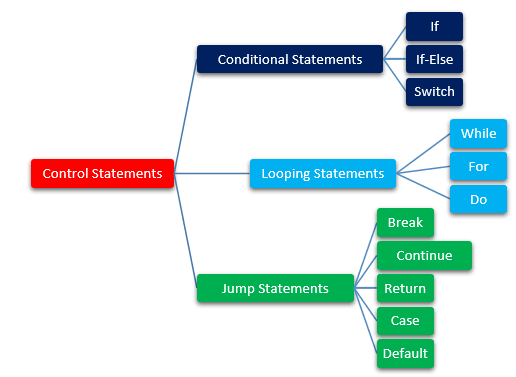
> There are three types in control statement.

> CONDITIONS STATEMENT

> LOOPING STATEMENT

> JUMPING STATEMENT

CONDITIONS STATEMENT ;

> this is fully controlled by condition.

> After that, the given condition is true. Another one true bolck statement will be execute.

> otherwise false block statement will be executed.

TYPES ;

> IF

> IF ELSE

> ELSE IF LADDER

> NESTED IF

IF ;

> It will go inside the block only if the condition is true otherwise, it will not execute the block.

SYNTAX ;


if(condition){
// statements (if Block)
}
//other statements

IF ELSE ;

> If the condition is true then, it will execute the If block. Otherwise, it will execute the Else block.

SYNTAX ;


if(condition){
// statements (if Block)
}
else{
// statements (Else block)
}
//other statements

ELSE IF LADDER ;

> the condition is true, then it will execute the If block.

> Otherwise, it will execute the Else-If block. Again, if the condition is not met, then it will move to the else block.

SYNTAX ;


if(condition){
// statements (if Block)
}
else if{
// statements (Else-If block)
}
else{
//statements(Else Block)
}//other statements

NESTED STATEMENT ;

> Nested if statement is if inside an if block.

> It is same as normal if…else statement but they are written inside another if…else statement.

SYNTAX ;

if (condition1) {
Statemen 1; //executed when condition1 is true


if (condition2) {
Statement 2; //executed when condition2 is true
}


else {
Statement 3; //executed when condition2 is false
}
}

SWITCH STATEMENT ;

>Switch statement allows program to select one action among multiple actions during the program execution.

SYNTAX ;


Switch(variable/value/expression){


Case : 1
// statements [];

Case : 2
// statements [];


default:
// statements [];


}

ANONYMOUS CLASS ;

> Anonymous object ; Anonymous simply means nameless.

> An object which has no reference is known as an anonymous object.

> It can be used at the time of object creation only.

> If you have to use an object only once, an anonymous object is a good approach.

> It is an inner class without a name and for which only a single object is created.

PROGRAM ;

class Display {
public void display() {
System.out.println(“Inside the Polygon class”);
}
}


class AnonymousDemo {
public void createClass() {

// creation of anonymous class extending class Display


Display D1 = new Display () {
public void display() {
System.out.println(“Inside an anonymous class.”);
}
};
D1.display();
}
}


class Main {
public static void main(String[] args) {
AnonymousDemo an = new AnonymousDemo();
an.createClass();
}
}

ACCESS SPECIFIER ;

> There are four type of acces specifier ; below see the types.

> DEFAULT

> PUBLIC

> PRIVATE

> PROTECTED

DEFAULT ;

> When ever a specific access level is not specified, then it is assumed to be default.

> The scope of the default level is within the package.

PUBLIC ;

> This is the most common access level and whenever the public access specifier is used with an entity.

> that particular entity is accessible throughout from within or outside .

> the class, within or outside the package, etc.

PRIVATE ;

> When an entity is private, then this entity cannot be accessed outside the class.

> A private entity can only be accessible from within the class.

PROTECTED ;

> The protected access level has a scope that is within the package.

> A protected entity is also accessible outside the package through inherited class or child class.

MODIFIED THE ACCESS TABLES ;

Access(specifier) >Inside >Inside >outside >outside

Class packege packege packege

Subclass


Private Yes No No No


Default Yes Yes No No


Protected Yes Yes Yes No


Public Yes Yes Yes Yes